Comprehensive guide to Middleware in ASP.NET Core - covering Request Pipeline concepts, operational mechanisms, roles, and step-by-step custom middleware implementation with practical examples.
No table of contents available for this article
If you're working with ASP.NET Core, you've definitely heard about Middleware. But what exactly is Middleware and why is it so important?
Before diving into Middleware, we need to understand a foundational concept: Request Pipeline.
Request Pipeline is a sequential processing mechanism for HTTP Requests from reception to response delivery. Think of it as an assembly line in a factory - each request goes through multiple processing stations before becoming the final product.
When a request from a browser reaches the server:
Step 1: Kestrel web server (ASP.NET Core's default web server) receives the request
Step 2: Request passes through the pipeline - a chain of processing components
Step 3: After processing, the response travels back through the pipeline
Step 4: Finally, the response is sent back to the client
Middleware components are the individual building blocks that make up this pipeline.
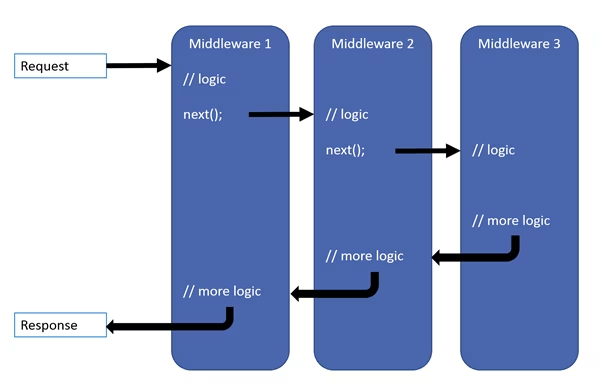
Middleware are components arranged in order within the request pipeline. Each middleware has the ability to:
Receive HTTP Requests
Execute its own processing logic
Decide to pass the request to the next middleware OR stop and return a response immediately
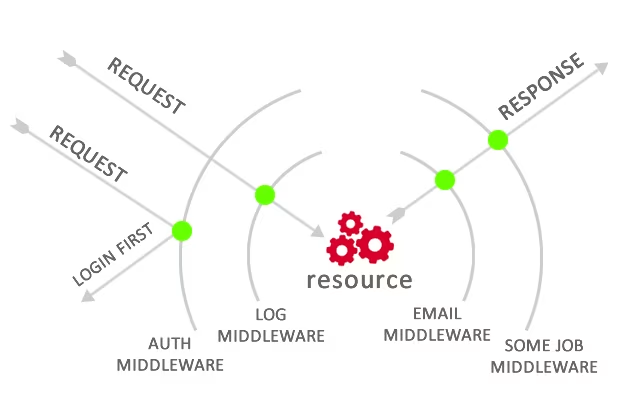
You can visualize middleware as "control gates" that requests must pass through. Each gate can inspect, modify the request, or even deny further passage.
To understand better, let's follow the journey of an HTTP Request:
HTTP Request from client arrives at Kestrel web server
Kestrel creates an HttpContext object containing all request and response information
HttpContext is passed to the first middleware
The first middleware receives the request and can:
Execute some logic (e.g., logging, authentication)
Forward the request to the next middleware
OR decide to stop and return a response immediately (short-circuit)
This process continues until reaching the last middleware in the pipeline.
After the last middleware finishes processing:
Response is passed back through the middleware chain
Each middleware gets a second chance to review and modify the response
Finally, the response reaches Kestrel and is sent to the client
Important point: Each middleware is called TWICE - once when the request comes in and once when the response goes out. This is a powerful feature that allows middleware to control the entire lifecycle of a request.
Suppose you have 3 middleware components: Authentication, Logging, and MVC. The request will go through Authentication first, then Logging, and finally MVC. When processing is complete, the response will return in reverse order: MVC, Logging, then Authentication.
Middleware acts as an intermediary bridge between client and server, handling common logic before requests reach the controller. Some popular applications:
Check if user is logged in
Validate tokens, sessions
Decide whether to allow access to current route
Record request/response information
Measure processing time
Track errors and performance
Catch and handle exceptions
Return consistent error responses
Normalize input parameters
Compress/decompress data
Parse request body
Handle Cross-Origin Resource Sharing
Add security headers
Prevent common attacks
Redirect users
URL rewriting
Now for the fun part - creating your own middleware! There are 2 mandatory requirements:
The middleware class must have a public constructor accepting at least one RequestDelegate parameter. This is the reference to the next middleware in the pipeline.
The class must have a public method named Invoke (or InvokeAsync) accepting HttpContext and returning Task.
csharp
public class CustomLoggingMiddleware
{
    private readonly RequestDelegate _next;

    public CustomLoggingMiddleware(RequestDelegate next)
    {
        _next = next;
    }

    public async Task Invoke(HttpContext context)
    {
        await context.Response.WriteAsync("<div>Request entering middleware</div>");

        await _next(context);

        await context.Response.WriteAsync("<div>Response leaving middleware</div>");
    }
}The _next variable stores the reference to the next middleware
The line await _next(context) is the most important - it calls the next middleware. Without this line, the pipeline will be blocked at this middleware
Code before await _next(context) runs when the request comes in
Code after await _next(context) runs when the response goes out
After creating middleware, you need to register it in the Startup.cs file (or Program.cs with .NET 6+):
csharp
public void Configure(IApplicationBuilder app)
{
    app.UseMiddleware<CustomLoggingMiddleware>();

    app.UseAuthentication();
    app.UseAuthorization();
    app.UseMvc();
}
Important note about order: The order of middleware registration is crucial! Middleware registered first will be called first. For example: Authentication middleware should come before Authorization.
csharp
public class ErrorHandlingMiddleware
{
    private readonly RequestDelegate _next;

    public ErrorHandlingMiddleware(RequestDelegate next)
    {
        _next = next;
    }

    public async Task Invoke(HttpContext context)
    {
        try
        {
            await _next(context);
        }
        catch (Exception ex)
        {
            await HandleExceptionAsync(context, ex);
        }
    }

    private static Task HandleExceptionAsync(HttpContext context, Exception exception)
    {
        context.Response.ContentType = "application/json";
        context.Response.StatusCode = 500;

        var result = new
        {
            error = exception.Message,
            statusCode = 500
        };

        return context.Response.WriteAsync(result.ToString());
    }
}Middleware is a core concept in ASP.NET Core, helping you:
Organize code clearly and maintainably
Reuse common logic across multiple endpoints
Control the entire lifecycle of request/response
Build cross-cutting features like logging, authentication, error handling
Understanding and mastering middleware will help you build professional and maintainable ASP.NET Core applications.
[1] Microsoft Docs - ASP.NET Core Middleware
[2] What is Middleware? - TopDev
[3] Andrew Lock - Understanding middleware pipeline
